

On this page
Subscribe to receive the latest blog posts to your inbox every week.
By subscribing you agree to with our Privacy Policy.
Most smart buildings today are surrounded by technology, but very few are truly unified by it. Controls, dashboards, analytics, reporting tools, energy applications, the stack keeps growing, yet operations still feel disconnected. KODE OS is built to solve exactly that problem: a single, open, agnostic operating layer that brings command and control to smart buildings by connecting systems, unifying data, and giving operators real authority across an entire portfolio.
KODE OS is an open, vendor-agnostic building operating system that unifies every system in a commercial building into one operational layer. Unlike traditional BMS platforms that control equipment in isolation, or smart building platforms that only read data, KODE OS normalizes data from 250+ integrations, provides write-back command and control across any BMS, and closes the loop from issue detection to resolution.
Key facts:
Digitization alone is not the same as operational intelligence. More software does not automatically make a building smarter. What matters is whether the systems, data, and workflows inside a building can actually work together. This guide walks through the landscape of building technology today, where it falls short, and how KODE OS bridges the gap between fragmented tools and true command and control.
To understand where KODE OS fits, it helps to clarify how most building technology is structured today and what each category is actually designed to do.
A Building Management System (BMS) is the operational backbone for many commercial buildings. It is designed to monitor and control core systems such as HVAC, lighting, and other building infrastructure. In many facilities, the BMS remains the primary interface through which operators manage equipment and respond to issues.
A BMS is essential, but it is not the whole picture. Most traditional BMS environments were not built to unify every source of building data, nor were they designed to provide a complete operational layer across the full building ecosystem. Proprietary architectures, vendor-specific integrations, and interfaces often constrain them, making it difficult to scale beyond their original purpose.
Think of the BMS as the building’s nervous system for a single set of equipment. It does one job well within tight boundaries. But controlling equipment is not the same thing as operating the entire building intelligently.
Point tools exist to solve one specific problem at a time. One tool may specialize in analytics. Another may focus on reporting. Another may deliver energy tracking, dashboards, or fault detection. These tools can provide meaningful value in their particular area, and in some cases they fill gaps left by legacy systems.
But point tools also introduce a new problem: fragmentation. When every use case requires its own application, building teams end up working across multiple interfaces, disconnected datasets, and siloed workflows. Data has to be stitched together manually. Insights often stay trapped in one product instead of informing broader decisions. Operators spend time switching between tools rather than managing outcomes.
A point tool can optimize a slice of the building. It rarely helps unify the building as a system.
A smart building platform represents the next step up. It aggregates data from multiple systems into dashboards and analytics, giving teams broader visibility than any single BMS or point tool can offer. Many products marketed as “smart building solutions” live here.
But most smart building platforms share a fundamental limitation: they read data but rarely write back. They are a viewing layer, not a control layer. They provide visibility but stop short of giving operators the tools to act on what they see. In practice, they can become yet another silo, one that shows more data without changing how buildings actually operate.
A building operating system goes further. It normalizes data from every system into a unified ontology, providing a single data model that makes every source comparable and queryable. Operators get command and control with write-back capability, meaning they can change setpoints, override schedules, and command equipment from a single interface regardless of the underlying BMS vendor. It enriches raw data into actionable metrics through a dedicated analytics engine. Continuously monitors for faults, energy waste, and comfort degradation. And it manages the full lifecycle from issue detection to resolution, closing the loop that platforms leave open.
The distinction matters because it sets expectations. A building operating system does not just show what is happening in your building. It gives you the tools to do something about it, at scale, across your entire portfolio. When the platform detects a fault, it commands the equipment, generates the work order, assigns the technician, and verifies the fix, all from the same place. That closed-loop capability is the dividing line between a platform that informs and a platform that transforms.
KODE OS is a building operating system. It is an open, agnostic operating layer that connects systems, unifies data, and gives customers the tools to visualize, analyze, report on, and act on what is happening across their building portfolio.
Rather than replacing every system in the building, KODE OS brings those systems together. Users no longer have to choose between control, visibility, analytics, reporting, graphics, and energy applications. They can access all of these capabilities through one platform built to support the real complexity of building operations.
Where most smart building platforms stop at reading data and displaying it on dashboards, KODE OS writes back to building systems. Operators can change setpoints, override schedules, and command equipment from a single interface, regardless of the underlying BMS vendor. KODE OS normalizes data from 250+ integrations into a unified ontology and compounds intelligence across every application through a shared data engine.
Here is how the three categories compare across key dimensions:
A typical commercial building runs five to fifteen disconnected systems. The BMS comes from one vendor. Metering comes from another. Access control from a third. Work orders live in spreadsheets or a CMMS that has never communicated with any of them. Energy data is scattered across utility portals, exported monthly as PDFs that no one reconciles in real time.
This is not a technology shortage. It is a coordination shortage. The issue is not that buildings lack software. It is that they lack a unified operational layer that can make all of these environments, systems, and datasets work together.
The result is predictable and expensive. Vendor lock-in traps operators inside proprietary ecosystems where data access becomes a negotiation, not a default. Data silos mean facility managers check three different portals before morning coffee and still have no unified picture of building performance. Operations become reactive because the only way to detect a failing economizer or a scheduling conflict is to wait until someone notices the comfort complaint or the energy spike.
The cost of fragmentation compounds over time. Research from Lawrence Berkeley National Laboratory finds that 15–30% of commercial building energy is wasted due to faults and improper controls, and the U.S. Department of Energy has estimated that undetected faults in U.S. commercial buildings waste roughly $14 billion in energy annually. Energy waste goes undetected for months because BMS data lives in one system and utility data lives in another. Maintenance teams respond to symptoms rather than root causes because fault detection, work orders, and equipment history sit in separate databases. Capital planning relies on gut feel and spreadsheets rather than unified performance data.
The industry has attempted to solve this. The first wave of solutions added analytics dashboards on top of existing systems. The second wave introduced cloud-based aggregation platforms. But most of these approaches share a fundamental limitation: they read data but cannot write back to building systems. They create another viewing layer, not a control layer. In practice, they become yet another silo.
What commercial buildings need is not another layer on top. It is an operating system underneath.
These are the industry realities that make a unified building operating system essential:
For many building owners and operators, one of the most persistent frustrations in the market is the inability to fully access, control, and act on their own building data.
Too often, data is technically available but practically inaccessible. It lives inside proprietary systems, fragmented interfaces, or workflows that prevent teams from using it in the ways they actually need. That creates a ceiling on innovation. If a customer cannot freely work with their own building systems and data, then every future initiative becomes harder. Optimization becomes slower. New applications become more difficult to deploy. Cross-system intelligence becomes harder to achieve. Autonomy becomes theoretical instead of practical.
A modern building platform should expand optionality, not reduce it. When customers can access their systems and data through an agnostic platform, they gain more than visibility, they gain flexibility and control.
That is why KODE OS treats openness and data ownership as foundational, not optional.
A building operating system is not valuable simply because it gathers data. Its real purpose is to bring order to complexity. In most buildings, critical information is scattered across systems that were never designed to work together. Controls in one place, alarms in another, maintenance somewhere else, and analytics layered on top without any real connection between them. The result is visibility without coordination.
A true building operating system is meant to solve that problem. It creates a shared operational layer across the building, so information does not just exist, it moves. Data can flow from connected systems into a common structure, become useful insight, surface issues that need attention, and support action in the same environment. Instead of forcing teams to jump between disconnected tools, it gives them a more unified way to understand and operate the building.
That is why the architecture matters. A strong building operating system should support five essential capabilities: Connect, Control, Understand, Detect, Act. These are not separate ideas so much as stages in a continuous chain. Systems need to be connected before they can be controlled. Data needs to be organized before it can be understood. Problems need to be identified before teams can respond. When those layers work together, the platform stops being a passive dashboard and starts functioning like real operational infrastructure.
KODE OS is built as a five-layer platform where each layer feeds the next. Data flows in through the Foundation, gets commanded through Cloud BMS, gets enriched into intelligence through Building BI, gets continuously monitored for issues through the Findings engine, and gets resolved through Action. The value chain follows a clear logic: Connect, Control, Understand, Detect, Act.
This architecture is intentional. Rather than assembling a collection of acquired point solutions under a single brand, KODE OS was designed as a unified platform from the ground up. The practical difference is that data does not need to be exported from one module and imported into another. A fault detected in the Findings layer already has access to the trending data in Cloud BMS, the normalized ontology in Core, and the work order system in AssetOps. Context travels with the data.
Each layer makes the layers above it more powerful. The Foundation provides clean, normalized data to Cloud BMS. Cloud BMS provides controllable systems and rich trending data to the Findings engine. Findings drive work into the Action layer. Building Intelligence provides visibility into all of it. This is not a stack of separate tools. It is an integrated system where value compounds at every layer.
Connection is where every building operating system either proves its value or falls apart. Before a platform can help teams monitor performance, surface issues, or automate action, it has to bring building data into one environment in a way that is secure, structured, and usable.
That foundation depends on three things. It needs strong security and governance, so access, permissions, and portfolio-level administration are built in from the start. It needs a common data model, so systems from different vendors and protocols can be understood in a consistent way rather than treated as isolated data sources. And it needs to remain open and able to connect with existing BMS platforms, IoT devices, meters, and third-party software without locking the customer into a closed ecosystem.
This layer matters more than any dashboard ever will, because everything above it depends on it. If the data foundation is fragmented, the insight will be fragmented. If the data is inconsistent, the analytics will be inconsistent. A building operating system is only as strong as the layer that connects and organizes the building beneath it.
KODE OS treats this layer as the groundwork for everything else. Launchpad provides the structure for managing users, buildings, and permissions across a portfolio, while Core creates a shared data model that makes systems from different vendors speak the same language. The KODE OS API Integrations framework brings building systems, sensors, and third-party applications into that common environment, so the platform starts from a unified foundation rather than disconnected data streams.
Once systems are connected, the next question is simple: can teams actually do anything with that information? Many smart building platforms stop at observation. They can show what is happening, but they cannot help operators respond from the same environment. A building operating system should go further by giving teams one place to monitor systems, analyze trends, manage schedules, and write commands back to the building.
This becomes especially important in mixed portfolios, where different sites rely on different BMS vendors and interfaces. Without a unified control layer, even basic actions become slower, more fragmented, and harder to standardize. Operators are forced to work across multiple systems, which creates friction in day-to-day operations and limits consistency across the portfolio.
A strong operating system should solve that by creating one control layer across the environment. Operators should be able to navigate graphics, trend data, compare performance, and make approved changes from a single interface. That is where visibility starts to become real operational control.
KODE OS delivers this layer through Cloud BMS.
KODE’s Cloud BMS gives operators a single place to work across building systems. Teams can trend data, manage schedules, navigate graphics, and interact with writable points without switching between vendor interfaces. What makes this compelling is not just centralized visibility, but the ability to operate more consistently across an entire portfolio.
Connected and controllable data becomes much more valuable when it can be turned into insight. A building operating system should not just show raw points and alarms. It should help teams answer operational questions, compare performance across buildings, and create metrics that different stakeholders can actually use.
That includes dashboards, KPIs, benchmarking, reporting, and portfolio-level analytics. It also means the platform should support different audiences. Engineers, operators, sustainability teams, and executives all need different views of the same underlying data.
This is also the layer where operational intelligence begins to connect with energy intelligence. For many portfolios, understanding building performance is not only about equipment behavior and alarms. It is also about utility consumption, emissions, demand trends, and how performance changes over time across an entire portfolio. A modern building operating system should make room for both day-to-day operational insight and broader energy and sustainability visibility, so teams are not forced to manage those priorities in separate data environments.
This is where a building operating system becomes more than a control interface. It becomes a decision-support layer. Instead of asking teams to piece together information from multiple systems, it should help them understand what is happening, where it matters, and what trends are emerging over time.
KODE OS supports this layer through Building BI and Building Data Hub, which turn raw building data into metrics, benchmarks, dashboards, and portfolio views that different teams can actually use, all customizable depending on user preferences.
EnerG fits naturally here as well, bringing together utility data, interval meter data, and sustainability metrics so teams can track consumption, benchmark performance, monitor emissions, and connect building operations to broader energy and decarbonization goals in one clearer picture.
Most buildings still operate reactively. Someone notices a comfort complaint. A utility bill spikes. A technician discovers a problem after performance has already suffered. A building operating system should help teams move earlier than that.
Its detection layer should continuously monitor for issues across equipment performance, energy waste, and comfort conditions. That usually requires more than one detection method. Real-time alarms help catch immediate problems. Fault detection helps identify ongoing issues that basic alarms may miss. Research from Lawrence Berkeley National Laboratory found that continuous FDD software delivers a median 10% whole-building energy savings. Functional testing helps verify whether equipment is actually operating as intended over time.
Together, these capabilities create a more proactive operating model. Instead of waiting for symptoms to surface, teams can identify issues earlier, understand likely causes faster, and prioritize what needs attention most.
KODE OS delivers this layer through Events, Fault Detection and Diagnostics (FDD), and the Functional Testing Tool (FTT). This is where the platform moves beyond passive monitoring to active oversight. Events allow teams to respond to live alarms and operational alerts in real time, while FDD continuously identifies deeper performance issues and equipment inefficiencies that standard alarms often overlook.
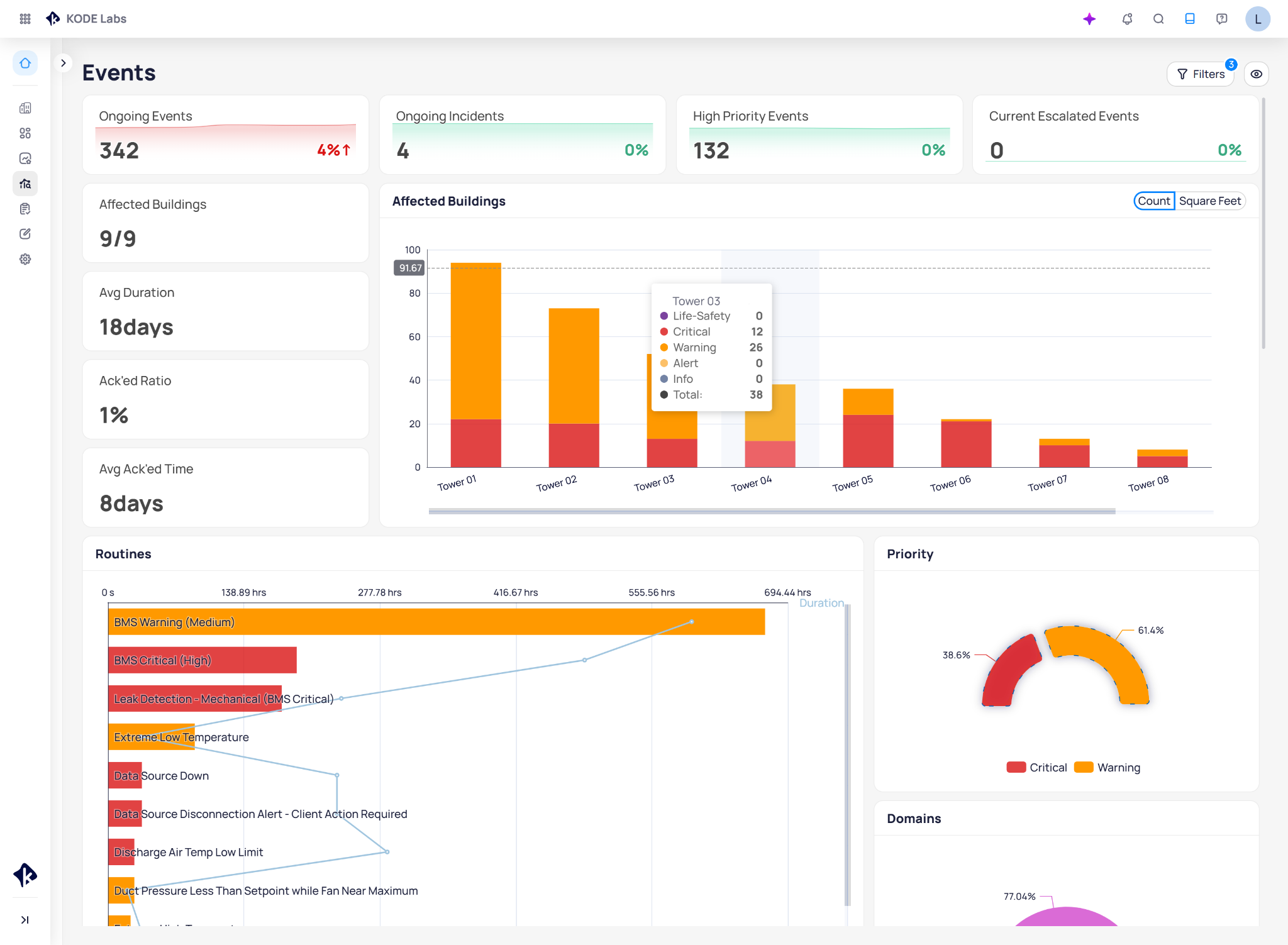
The FTT turns performance verification into an ongoing process rather than a one-time event, ensuring systems respond exactly as intended. Together, these tools shift building operations from a reactive model to one that is truly proactive.
KODE OS monitors your building 24/7 across three dimensions: real-time alarms, continuous fault detection, and scheduled functional testing. These tools shift operations from reactive to proactive, ensuring nothing slips through the cracks.
The final test of a building operating system is whether it helps teams actually resolve issues. Insight alone is not enough. A platform creates real value when a detected issue can lead directly to action, whether that means creating a work order, assigning a task, tracking resolution, or applying an optimization automatically.
This is where disconnected platforms often break down. They may identify the issue, but the operations team still has to jump into another system to document, assign, and follow up manually. A building operating system should reduce that gap.
The ideal outcome is a closed loop. The system detects the issue, gives the operator the context behind it, supports the resolution workflow, and helps verify whether the fix worked. That is what turns a collection of tools into an operating model.
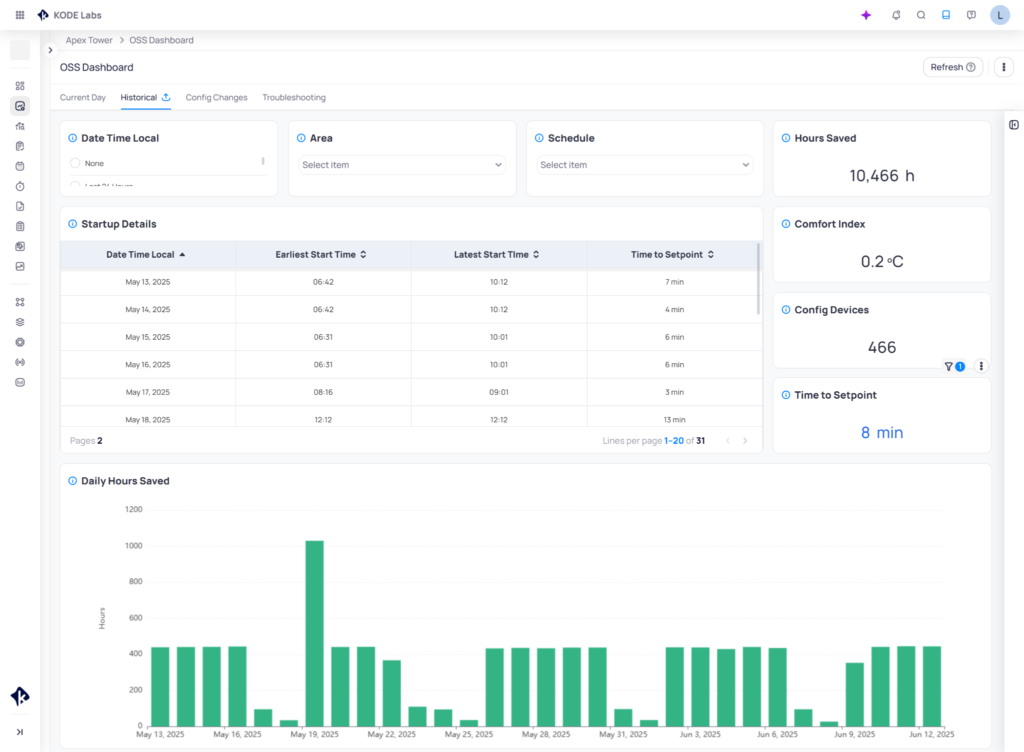
KODE OS closes the loop through AssetOps and Optimized Start Stop (OSS). AssetOps supports maintenance workflows such as work orders, preventive maintenance, and asset tracking.
Whereas OSS applies automated HVAC optimization to reduce unnecessary runtime while protecting comfort. This gives the platform a more complete role in operations: not only identifying what needs attention, but helping move it toward resolution.
Think of it this way: if the building is the body, the operating system is the brain. A building already has its own “organs, muscles, senses, and vital systems”, HVAC, lighting, meters, alarms, maintenance workflows, and all the infrastructure that keeps it running. But without a central intelligence layer, those systems often operate in isolation. Information exists, but it does not move through the building in a coordinated way.
A building operating system changes that. It connects to the building like a nervous system, carrying signals in, organizing them, interpreting them, and triggering the right response. Data from different systems becomes part of one shared model. Issues can be recognized in context instead of as isolated events. Actions can follow insight without requiring teams to jump between disconnected tools.
For KODE, that means API Integrations act as the connection points between the platform and the building’s many systems. Core organizes those incoming signals into a unified data model, while Launchpad gives teams a clear operational entry point. Building BI functions as the reasoning layer, turning raw building data into patterns, metrics, and insights.
For KODE OS, Events and Faults surface signs that something is wrong, much like sensory signals alert the body to stress. FTT adds another layer by testing whether systems are responding the way they should, more like a diagnostic exam than a passive alert. Cloud BMS sends commands back into the building, while AssetOps helps coordinate the operational response. Optimized Start Stop (OSS) works quietly in the background, continuously adjusting performance to reduce waste and maintain comfort.
That is why architecture matters. The goal is to give the building a coordinated way to sense, interpret, and respond, so operations become more proactive, more consistent, and more scalable over time.
KODE OS stands apart not because it does one thing better than a point tool, but because it addresses the larger operational problem that point tools and legacy systems leave unresolved. Here is what sets it apart:
The platform is the “how.” Outcomes are the “so what.” Every building type has different priorities, different stakeholders, and different definitions of success. The KODE OS architecture is designed so that its layers compose into outcome-driven packages tailored to each environment.
Proactive maintenance programs, facility management governance KPIs, energy waste reduction, comfort management, and space utilization insights. The operations team gets a unified command center; leadership gets portfolio-level visibility into performance, cost, and compliance.
NOI improvement through energy optimization, tenant experience differentiation, portfolio-level energy management, ESG reporting for investors and regulators, and asset valuation support. The platform connects operational performance to the financial metrics that drive CRE decision-making.
Energy optimization across distributed portfolios, reduced truck rolls through remote monitoring and diagnostics, and scalable oversight of hundreds or thousands of locations. Retail operations and maintenance teams need consistency and visibility at a scale that single-building tools cannot deliver. When every store runs on the same platform, national rollouts of energy policies, maintenance programs, and equipment upgrades become manageable rather than heroic.
Each of these outcomes draws from the same five-layer architecture. Foundation, Command and Control, Intelligence, Findings, and Action compose into tailored solutions for every building type. The platform does not require different deployments for different verticals, it requires different configurations, different dashboards, different fault libraries, different KPI definitions, all built on the same unified data model.
The only way to truly have a smart building is to account for all of the systems and data inside it. The companies that bring systems, data, and action together, in ways that actually change how buildings operate, will define the future of smart buildings, not those offering the most isolated features.
Traditional BMS platforms still have an important role. Point tools can still solve valuable problems. But neither one on its own creates the complete operational foundation that the next generation of buildings requires.
KODE OS is different because it goes beyond a single category. It brings together graphics, analytics, Cloud BMS, reporting, energy capabilities, fault detection, maintenance management, and automation in one open, agnostic platform designed for real buildings, real data, real systems, and real operational outcomes. The platform moves buildings from disconnected technology toward true command and control, and ultimately toward autonomy.
If your current building technology stack delivers visibility but still leaves operations fragmented, it may be worth rethinking the model.
KODE OS helps organizations bring systems together, access and use their data more effectively, and operate buildings through one open platform built for real-world complexity.
Connect with KODE Labs to explore what a more unified approach to building operations can look like, book a demo.
KODE OS is an open, vendor-agnostic building operating system that unifies every system in a commercial building (HVAC, lighting, metering, access control, maintenance) into one operational layer with command and control, analytics, fault detection, and work order management built in.
A BMS controls specific equipment within a single vendor’s ecosystem. KODE OS sits above the BMS, connecting any vendor’s controls, normalizing all building data into a unified ontology, and providing write-back command across the entire portfolio from a single interface.
Most smart building platforms are read-only. They aggregate data into dashboards but cannot change setpoints or command equipment. KODE OS writes back to building systems, so operators can detect, diagnose, and act from the same platform without switching tools.
KODE OS connects to 250+ systems across IoT devices, BMS platforms, meters, access control, enterprise software, and third-party applications. A public API provides real-time read and write-back capability.
No. KODE OS is designed to work with existing BMS platforms, not replace them. It sits as an operating layer above the BMS, unifying data and providing command and control across whatever systems are already installed.
KODE OS supports corporate offices, Class A commercial real estate, retail portfolios, and other commercial building types. The platform is tailored to each use case.
KODE OS combines continuous fault detection (FDD), functional testing (FTT), and automated optimization like Optimized Start Stop (OSS). Undetected HVAC faults waste 15–30% of commercial building energy. Fault detection software recovers a median 10% whole-building energy savings. KODE OS finds those faults and eliminates them. KODE OS helps businesses cut energy costs by 30%.
The client does. KODE OS treats openness and data ownership as foundational. The Core layer normalizes data into an accessible, standardized model, and a public API ensures customers can access, contextualize, and operationalize their own building data rather than being locked into a proprietary ecosystem.

Michael Kovalcik
Product Management, KODE Labs
News, insights and resources from the world of smart building management.
By clicking "Sign Up" you're confirming that you agree with our Terms and Conditions.
Verdantix has named KODE Labs a Leader in its Green Quadrant: Unified Building Orchestration Platforms (2026). More important than the…
Read more
AI is quickly becoming part of the building technology conversation, but AI-ready operations require more than adding a new interface…
Read more
Originally published on Leadership Today To redesign work for AI, leaders have to look beyond adding new technology to existing jobs…
Read more
