By KODE Team
On this page
Subscribe to receive the latest blog posts to your inbox every week.
By subscribing you agree to with our Privacy Policy.
Most employees don’t think about indoor air quality until something feels wrong. A meeting room is too warm, the air feels stuffy, or people begin complaining about comfort. By then, productivity has already been affected.
Indoor air quality monitoring helps organizations detect these issues before they become larger problems. Rather than relying on guesswork, it provides continuous insight into workplace conditions and helps facilities teams understand what’s happening across their buildings.
Indoor air quality (IAQ) monitoring measures factors like CO₂, VOCs, temperature, and humidity to help organizations understand whether their workplace supports occupant comfort and well-being. While traditional monitoring identifies when conditions fall outside healthy ranges, it often stops there.
KODE OS extends IAQ monitoring beyond sensors by connecting environmental data with occupancy, comfort complaints, and facility workflows. Instead of simply reporting that a space is uncomfortable, it provides the context needed to investigate the cause, route issues to the appropriate facilities team, and verify that the problem has been resolved.
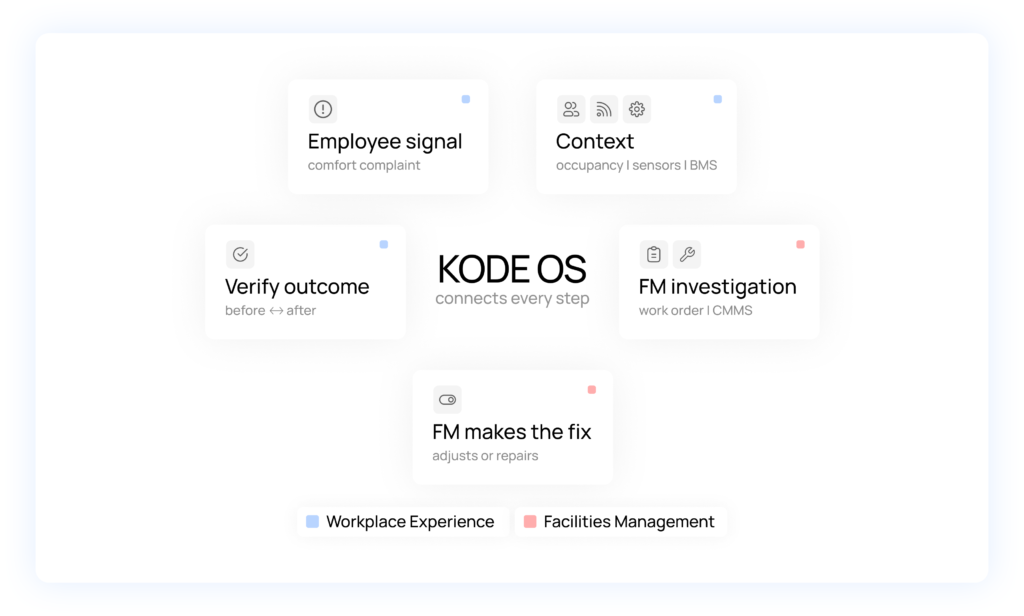
The connected flow:
Employee complaint → Occupancy → Indoor conditions → Equipment investigation → Work order → Employee outcome
Indoor air quality (IAQ) monitoring continuously measures core indoor environmental quality (IEQ) components such as CO₂, temperature, humidity, and volatile organic compounds (VOCs) against healthy building standards and comfort setpoints to help organizations understand the environments employees work in every day.
On its own, however, environmental data only tells part of the story.
By the time someone reports that a meeting room is too warm, employee comfort and productivity may have already been affected. A complaint tells you what happened, but it doesn’t explain why.
Was the room overcrowded? Did the temperature drift outside the desired range? Was there an unresolved maintenance issue?
Understanding workplace comfort requires connecting these signals. By combining environmental conditions with employee feedback, occupancy data, and facilities information, workplace and facilities teams gain the context they need to investigate issues, identify likely causes, coordinate the right response, and verify that comfort has improved.
KODE OS brings these data sources into one operating layer, helping teams move beyond monitoring conditions to understanding and improving the employee experience.
A comfort dashboard can tell you that something is wrong, but it rarely explains why or what should happen next.
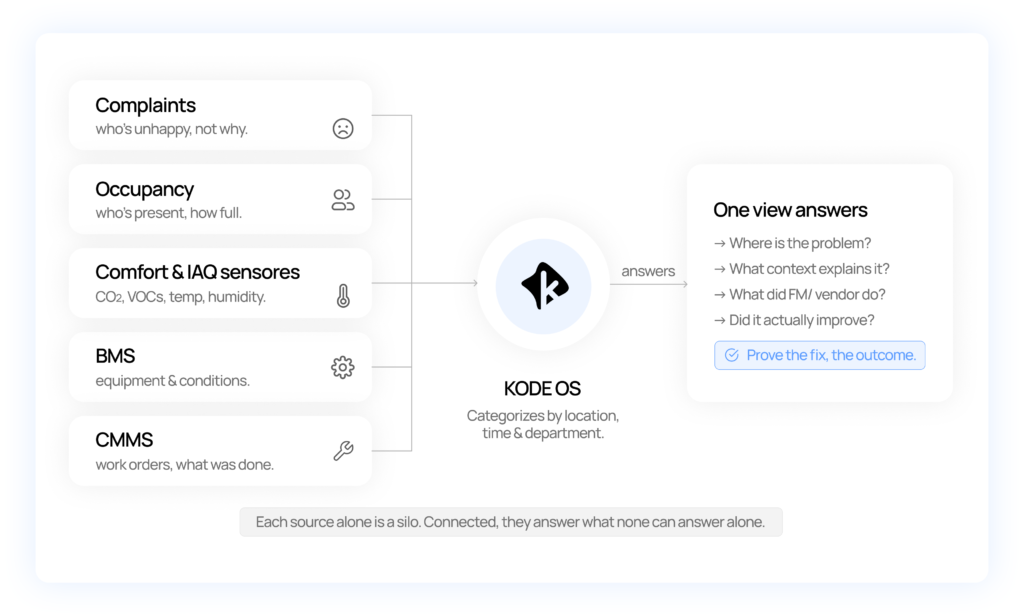
Employee complaints, building systems, occupancy data, and maintenance records often live in separate applications. Each provides a different piece of the story, forcing workplace and facilities teams to manually connect the dots before they can identify the root cause of a problem.
| System | What it tells you | What it can’t tell you |
|---|---|---|
| Complaint platform | Employees are uncomfortable | Why they’re uncomfortable |
| Building Management System (BMS) | Equipment performance and environmental conditions | Whether employees were affected |
| CMMS | Maintenance work was completed | Whether the employee experience improved |
KODE OS brings these data sources together into a single evidence chain, giving Workplace Experience (WX) and Facilities Management (FM) teams the context they need to investigate issues, prioritize the right response, and verify that the problem has been resolved. Instead of treating every complaint as a separate event, teams can understand the complete journey, from the first employee signal to the final outcome.
Imagine employees on the 18th floor repeatedly report that a meeting room feels too warm every afternoon. This complaint tells you there’s a problem, but it doesn’t explain what’s causing it.
This is where a connected workplace platform helps Workplace Experience (WX) and Facilities Management (FM) work together to move from a symptom to a solution.
KODE OS groups by location, time, department, and complaint type. In this case, complaints consistently occur in the same meeting area between 2:00 and 4:00 p.m.
Occupancy data shows the room is heavily used during that period, while environmental sensors confirm temperatures rise at the same time. Instead of treating each complaint as an isolated ticket, the platform reveals a recurring pattern.
With the relevant context in one place, WX shares the findings with FM. Facilities teams review building management system (BMS) trends, equipment performance, and maintenance history to determine whether the issue is caused by an equipment fault, an operating schedule, a sensor issue, or simply unusually high occupancy.
KODE OS provides the evidence, while FM remains responsible for diagnosing the technical issue.
Once the cause is identified, FM carries out the appropriate adjustment or repair using their existing building management and maintenance workflows.
Workplace teams keep employees informed and help prioritize issues based on their impact, but all building changes remain reviewed and executed by FM.
Resolving a work order doesn’t always mean the employee experience has improved. KODE OS compares conditions before and after the intervention, helping teams confirm that temperatures remain within the desired range during occupied hours and that repeat complaints decline over time.
Instead of measuring whether work was completed, organizations can measure whether the problem was actually solved.
Resolving a comfort complaint is just one example of what connected workplace operations make possible.
By connecting employee comfort complaints with building context, facilities workflows, and verified outcomes, organizations can improve how they investigate, prioritize, and resolve a wide range of workplace challenges.
Instead of treating every hot or cold complaint as an isolated issue, identify recurring patterns by combining comfort complaints with occupancy and environmental data. Facilities teams receive the context they need to investigate more efficiently, while workplace teams can verify that the issue stays resolved over time.
Not every complaint requires mechanical intervention. Connected data helps determine whether a problem affects multiple occupants, points to a faulty sensor, or reflects an individual comfort preference. This helps reduce unnecessary technician visits while ensuring genuine building issues reach the right team.
By combining IAQ data with occupancy and comfort complaints, workplace teams can identify spaces where poor air quality affects the greatest number of people.
Facilities teams can then investigate the likely cause while workplace teams make temporary adjustments, such as room-booking guidance, until the issue is resolved.
When complaints, maintenance history, occupancy, and environmental data are connected, recurring issues become easier to spot.
Instead of repeatedly addressing the same symptoms, organizations can identify chronic problem areas and focus on long-term corrective action.
Completing a work order doesn’t necessarily mean the problem has been solved. Connected data helps teams compare conditions before and after an intervention, confirming that employee comfort has improved, not just that maintenance has been completed.
When technician resources are limited, connected workplace data helps prioritize issues based not only on technical severity but also on the number of people affected, complaint frequency, and the importance of the space.
Before executive meetings, client visits, or company events, workplace and facilities teams can review recent comfort, IAQ, maintenance, and equipment history to reduce the risk of disruptions and create a better experience for attendees.
Connected workplace data helps quantify both the operational and employee impact of aging equipment. By combining maintenance history with complaint trends, environmental conditions, and occupant impact, organizations can make more informed investment decisions.
Traditional workplace metrics often focus on activity: Was a work order completed? How many tickets were closed? How quickly did someone respond?
Connected workplace operations make it possible to measure something more meaningful, whether the actions taken actually improved the employee experience. By connecting comfort complaints, environmental conditions, occupancy, and maintenance data, organizations can track both operational performance and workplace outcomes.
Some of the most valuable metrics include:
By connecting comfort complaints, environmental conditions, maintenance activity, and outcomes, organizations can move beyond activity-based metrics and measure what actually matters: whether the employee experience improved.
Comfort isn’t created by monitoring alone. It’s created by understanding what’s happening, coordinating the right response, and confirming the issue has been resolved.
KODE OS connects comfort complaints, occupancy insights, indoor conditions, and existing facility workflows into one streamlined process. Workplace Experience teams gain visibility into employee comfort, while Facilities Management teams have the context they need to investigate, resolve, and verify every issue.
With KODE OS, teams can turn workplace insights into action and deliver more responsive experiences across every building.
Book a Demo | Explore the KODE OS Platform
No. KODE OS is a shared decision, coordination, and evidence layer. Every building change is human-reviewed and executed by the FM through their normal BMS/CMMS workflow.
A dashboard shows a reading. KODE OS connects the reading to the complaint, the occupancy, the equipment investigation, the work order, and the verified outcome is one chain instead of separate tools.
WX identifies and prioritizes experience problems, supplies human-impact context, and verifies the outcome. The FM diagnoses the technical cause and executes the fix.
Employee comfort complaints, occupancy data, comfort and IAQ sensors, the BMS, and the CMMS/work-order history, joined by location, time, and department.
By comparing conditions and complaints before and after, during equally occupied periods, and only closing the experience issue once the employee-facing result holds for several days.
Check whether nearby sensors are out of range and whether other occupants report the same thing. Systemic patterns go to FM; isolated, in-range complaints are handled as individual accommodations.
Yes. It adds an objective people-impact layer on top of asset criticality, so the highest-impact issues are scheduled first.

KODE Team
News, insights and resources from the world of smart building management.
By clicking "Sign Up" you're confirming that you agree with our Terms and Conditions.
September was about closing the gap between seeing and acting. Operational teams aren’t short on signals. Faults surface in FDD.…
Read more
More systems connected. Faster paths from data to action. September expands the KODE OS integration ecosystem across building automation, access…
Read more
AI is quickly becoming part of the building technology conversation, but AI-ready operations require more than adding a new interface…
Read more