On this page
Subscribe to receive the latest blog posts to your inbox every week.
By subscribing you agree to with our Privacy Policy.
A vendor closes the work order at 2:10 p.m. Five minutes later, the rooftop unit is still in alarm. The CMMS shows the job as complete, but the BMS continues to report the fault. The mismatch remains hidden until a store manager calls or the same alarm generates another ticket.
Work order governance means checking each work order against the equipment it was written for. KODE OS now does that check automatically, using real-time FDD signals and the status your CMMS reports back.
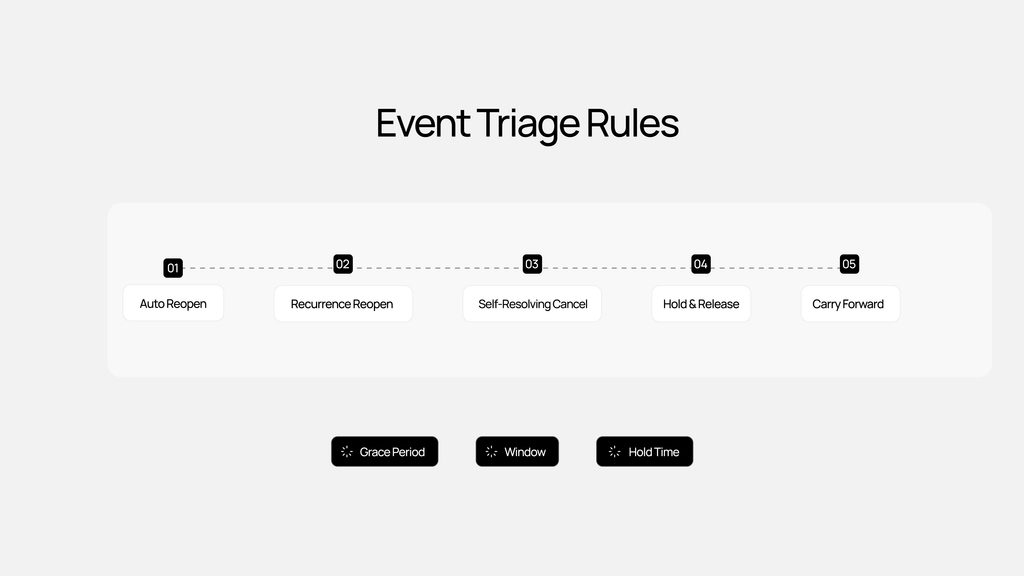
Work order governance in KODE OS keeps every FDD-generated work order tied to the alarm and equipment that triggered it. Five Event Triage Rules compare the live alarm with the status recorded in your CMMS. Depending on the result, KODE OS can reopen a work order, link repeat alarms to the existing ticket, hold low-priority work until a site visit is warranted, or cancel a job that is no longer necessary.
A CMMS records the reported status of a job: dispatched, in progress, or closed. On its own, it cannot confirm what is happening at the equipment. The BMS and FDD provide that equipment context but have no visibility into the work order. When the systems are not connected, someone has to reconcile them manually, often after a complaint.
That gap shows up in the same few ways at almost any portfolio that sends outside trades through a CMMS:
In an occupied building there’s a second cost. The tenant, the employee or the store manager calls before the technician arrives.
KODE OS gives you one owner-controlled model of your portfolio, built on the systems you already have. In that model, each alarm is linked to the equipment it came from and to the work order raised for it. The work order’s status stays in sync with your CMMS, so KODE OS knows when a vendor marks a job dispatched, in progress or closed.
With both facts in one place, the comparison is simple. If the CMMS says closed and the equipment is still in alarm, the work isn’t finished. Work order governance in KODE OS is a set of five Event Triage Rules that act on that comparison, so nobody has to open two systems to check.
The rules are part of FDD and apply to events, the conditions your FDD routines detect on equipment in real time. They work with any CMMS that has an API for updating work orders, once it’s connected to KODE OS.
Each rule watches for one kind of mismatch between an alarm and its work order.
The rules cover work orders your team creates from an event in KODE OS, as well as the ones KODE OS creates automatically.
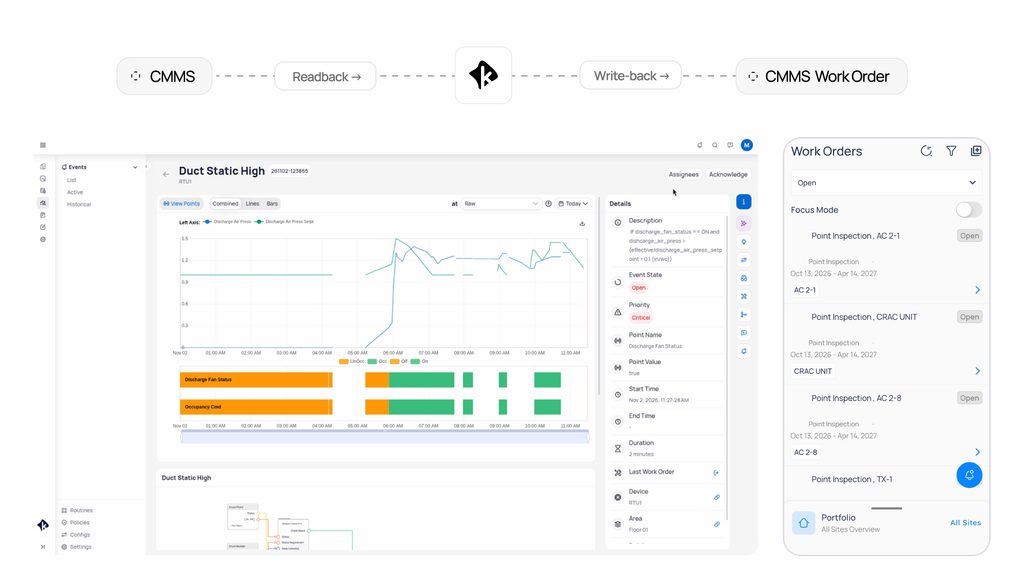
Event Triage Rules sit in FDD, under Settings and then Triage Rules. You choose which rules are on and set the timings that fit how your buildings and vendors work.
| Rule | What you set | Default |
|---|---|---|
| Bad closure | Grace period after the CMMS closes the work order | 0 minutes |
| Recurrence reopen | Recurrence window after closure | 7 days |
| Self-resolving cancellation | Hold time the alarm must stay inactive | 24 hours |
| Hold and release | Which priorities trigger the release | P1 and P2 |
| Carry forward | Nothing to set | On |
The defaults are a starting point. A grace period of zero reopens the work order as soon as the CMMS closes it while the alarm remains active. A longer period gives equipment time to settle after a repair, which can be useful when an alarm takes time to clear after a unit restarts.
The recurrence window determines how long a closed work order remains linked to the fault it was intended to fix. The hold time controls how long a self-clearing alarm must remain inactive before the work order is canceled. A longer hold provides greater confidence that the alarm has cleared permanently.
Once set, the rules run in the background across the portfolio. They need a work order connector on the building, because without one there’s no CMMS status to compare against.
The rules are the same everywhere. Which ones matter most depends on how you dispatch.
Four counts tell you what the rules are doing each month: work orders reopened as bad closures, work orders reopened on recurrence, work orders canceled as self-resolved, and alarms carried forward onto open work orders.
Canceled and carried-forward work orders represent tickets that might otherwise have been raised or dispatched. Multiply those counts by your average trip charge to estimate potential savings. Reopened work orders provide a measure of closure quality and are worth reviewing with each vendor.
With Event Triage Rules on, your work orders update as the alarms do. Repeat alarms go to the same ticket, and your team is only dispatched when the job is still open.
The full settings reference is in the KODE OS documentation.
It is the practice of checking each work order against the live state of the equipment it was raised for, and correcting the work order when the two disagree. In KODE OS, Event Triage Rules do this automatically.
Once the grace period ends, KODE OS reopens the same work order. The default grace period is zero minutes.
Two rules handle it. Carry forward attaches a repeat alarm to a work order that is still open. Recurrence reopen brings back the original work order when the alarm returns within the recurrence window, which is seven days by default.
If the alarm stays inactive for the hold time, 24 hours by default, and nobody has acted on the work order, KODE OS cancels it. If the alarm returns first, the timer resets.
No. Vendors and engineers keep working in your CMMS. KODE OS reads the work order status from it and keeps that work order in line with the alarm.
The rules apply to any building in KODE OS that uses a work order connector. That includes common CMMS platforms such as ServiceChannel, IBM Maximo, Corrigo and Prism.
Yes. You choose which rules are on and set the grace period, recurrence window and hold time in FDD settings.

Michael Kovalcik
Product Management, KODE Labs
News, insights and resources from the world of smart building management.
By clicking "Sign Up" you're confirming that you agree with our Terms and Conditions.
Hearing “Yes, we can integrate with your BMS” is a good starting point when you evaluate a building platform. However,…
Read more
Your tenant already knows there’s a problem. Why don’t you? A conference room slowly warms throughout the morning. CO₂ levels…
Read more
Originally posted on Mann Report Ask your facility manager how many vendors currently have remote access to your building. Most…
Read more